The genealogy of the shader explains why modern VJ workflows can run high-quality visuals in real time with tiny files. To understand why ISF matters, you need to trace the path from low-level GPU programming to a portable format that artists can actually use in performance.
Before ISF: When Real-Time Graphics Belonged to Programmers
GLSL stands for OpenGL Shading Language. In simple terms, it is the programming language used to talk directly to the GPU. GLSL powers modern game effects, advanced 3D rendering, and real-time visual processing.
You can think of the CPU as an Olympic athlete: highly flexible, fast, and smart, but handling only a few complex tasks at once. A GPU is more like an army of 5,000 ants: each unit is simple, but thousands work in parallel and finish massive workloads almost instantly.
That is why GPUs are used to draw images on screen. They process and paint pixels at scale, in parallel. GLSL takes advantage of this architecture to calculate lighting, distortion, color transformations, and complex visual behavior in real time. It is highly optimized for linear algebra operations.
A “shader” is the file containing GLSL code, usually with a .glsl extension.
The Limitation of Raw GLSL for VJs
Classic GLSL shader files were technical assets: no UI controls, no standard metadata, and no universal implementation pattern across visual software.
Each application integrated shaders differently, so sharing visual patches between platforms was difficult or impossible. In practice, this meant shader workflows were mostly reserved for developers, not working VJs under live show conditions.
Vidvox Enters the Scene
Vidvox (the team behind VDMX) had years of experience working with visual artists and clearly saw the gap:
- Shaders were powerful.
- Shaders were inaccessible to most VJs.
- Shader integration into creative workflows was inconsistent.
In 2013, they introduced a new idea: a format that made shaders as usable as video clips. ISF was created as an open format to describe GLSL shaders and define how users could interact with them.
The Birth of ISF: The “MP3” Moment for Shaders
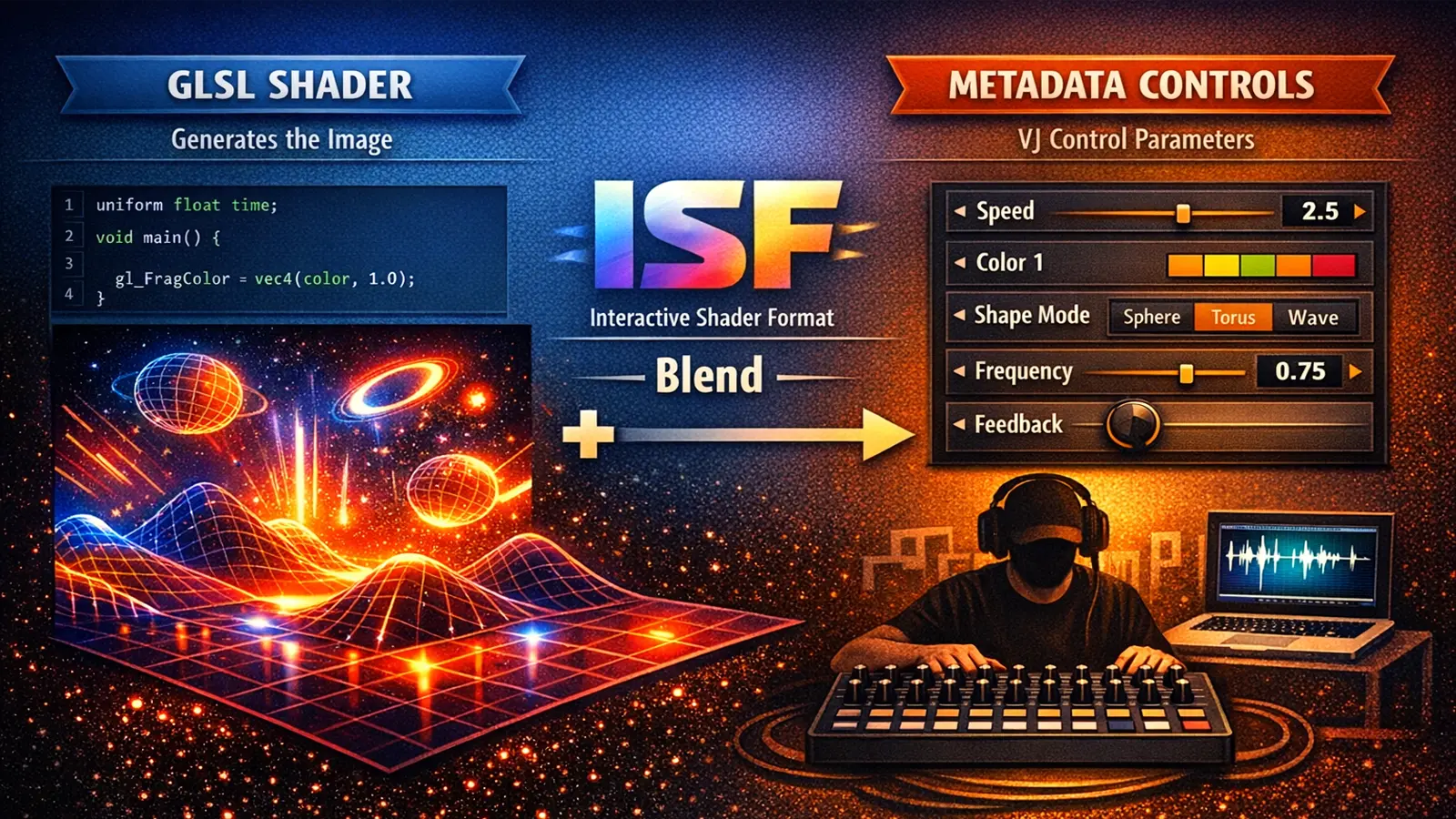
ISF (Interactive Shader Format) combines:
- GLSL code that generates the image.
- Structured metadata that defines controls the VJ can manipulate.
This transforms a technical shader into a performance-ready visual unit:
- with sliders and controls,
- with clear parameters,
- with compatibility across host applications.
ISF was designed to be simple, modular, and reusable, so one shader can run in any compatible software without being rewritten.
Why ISF Changed VJ Workflows
Before ISF, each app used its own format. With ISF, for the first time:
- shaders became portable across applications,
- VJs could control parameters live,
- developers could build tools around a shared standard,
- the community could build a common library.
Today, ISF is integrated into tools like VDMX, Synesthesia, Magic Music Visuals, and many others listed in the official integrations ecosystem.
ISF and the Democratization of Generative Visuals
ISF allows any VJ, even without programming skills, to:
- change colors,
- adjust speed,
- create distortions,
- map controls to audio,
- mix shaders like video layers.
At the same time, developers can keep building advanced shader logic while packaging it in an accessible, reusable format for artists.
Many VJs consider this shift the end of static visuals and the beginning of a new visual paradigm. For deeper context, read Chapter 1: The End of Static Visuals.
Conclusion: ISF Is Not Just a Format, It Is an Evolution
Vidvox did not just publish a specification. They helped establish an ecosystem.
Today, that ecosystem includes:
- hundreds of free shaders,
- open documentation,
- online tools such as ISF Editor Online,
- desktop tools like ISF Editor for testing and iteration.
Thanks to ISF, VJs can work with living, generative, and reactive visuals without needing to code from scratch. The ecosystem keeps growing through artists, developers, and a global community that now shares a common visual language.
Frequently Asked Questions
Technical Appendix
This appendix centralizes quick references for this chapter, including cited links and chapter navigation for faster study and review.
Referenced Links
- OpenGL Shading Language Wiki
- VDMX
- ISF Docs
- Synesthesia
- Magic Music Visuals
- ISF Integrations
- Chapter 1: The End of Static Visuals
- ISF Editor Online
- ISF Editor